
Tembo3.1.1 - Download
You'll be able to download in few seconds.
Publisher Description
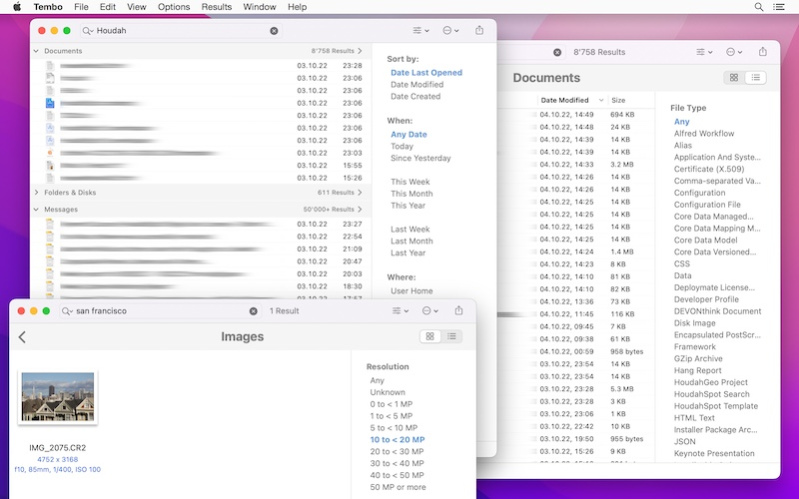
Tembo: Easy and Effective File Search. Tembo finds files, folders, music, photos, ... .
Tembo shows results grouped by file type. Initially, the top 10 matches for each group are shown. Often enough you will find the sought for file right here.
Drill-down into a group reveals up to 10'000 results alongside context-sensitive filters. These help narrow down the results list. The 'Messages' group, for example, has filters on subject, sender and recipient. The 'Images' group has filters for resolution and file type.
Why use Tembo rather than Spotlight or the Finder?
- You'll be faster to find the files you are looking for
- Easy to use interface
- Grouped search results
- Up to 10'000 results in each group
- Context-sensitive filters
What filters are available?
- Bookmarks: Type, URL Domain
- Documents: File Type
- Fonts: File Type
- Images: Resolution, File Type
- Messages: Subject, From, To
- Movies: File Type, Codec
- Music: Artist, File Type
- PDF Documents: Author
- Source Code: File Type
Which files can Tembo find?
Tembo is based upon the Spotlight index and engine. Tembo can find any file indexed by Spotlight.
This includes files in the Library folders. This excludes many low-level system files.
About Tembo
This File & Disk Management program is available in English, French, German. It was last updated on 29 September, 2026. Tembo is compatible with the following operating systems: Mac.
The company that develops Tembo is Houdah Software s. r.l. The latest version released by its developer is 3.1.1.
The download we have available for Tembo has a file size of 8.4 MB. Just click the green Download button above to start the downloading process. The program is listed on our website since 2023-09-22 and was downloaded 0 times. We have already checked if the download link is safe, however for your own protection we recommend that you scan the downloaded software with your antivirus. Your antivirus may detect the Tembo as malware if the download link is broken.
How to install Tembo on your Windows device:
- Click on the Download button on our website. This will start the download from the website of the developer.
- Once the Tembo is downloaded click on it to start the setup process (assuming you are on a desktop computer).
- When the installation is finished you should be able to see and run the program.
Program Details
System requirements
Download information
Pricing
Version History
version 3.1.1
posted on 2023-09-22
* Updated for macOS 14 Sonoma
* Caveat: Apple Mail on macOS 14 no longer accepts plug-ins. Tembo will not be able to search your Apple Mail messages
* Various bug fixes. Thank you for reporting bugs
version 3.0.1
posted on 2022-11-05
- Fresh New Look
- Search Apple Mail Messages
- Favorite Tags
- Enhanced Grid View
- Native to Apple Silicon
version 2.1.3
posted on 2016-12-01
* Drag files from search results to the Trash to delete
* Tembo now shows Finder tag colors in search results
* Long file names now wrap over two lines in grid view
* Improved performance and responsiveness in the grouped display of search results
version 1.1
posted on 2011-01-10
Tembo 1.1 brings a refined interface as well as basic AppleScript support
Disclaimer
External Download
We do not host Tembo on our servers. We did not scan it for viruses, adware, spyware or other type of malware. This app is hosted by the software publisher and passed their terms and conditions to be listed there. We recommend caution when installing it.
The external download link for Tembo is provided to you by apps112.com without any warranties, representations or guarantees of any kind, so access it at your own risk.
If you have questions regarding this particular app contact the publisher directly. For questions about the functionalities of apps112.com contact us.
